
ShipTime now provides Proof of Delivery (POD) documents directly within your account.
You no longer need to visit individual courier websites to retrieve delivery confirmation. PODs are now accessible directly from History & Tracking under the Manage section of your ShipTime account.
This update makes it faster and easier to confirm deliveries, share documentation with customers, and keep records for your shipments.
You can access PODs by following these steps:
Log in to your ShipTime account.
Navigate to Manage > History & Tracking.
Locate the shipment you are looking for.
Click into the shipment details.
Download or view the Proof of Delivery (POD) directly from the shipment record.
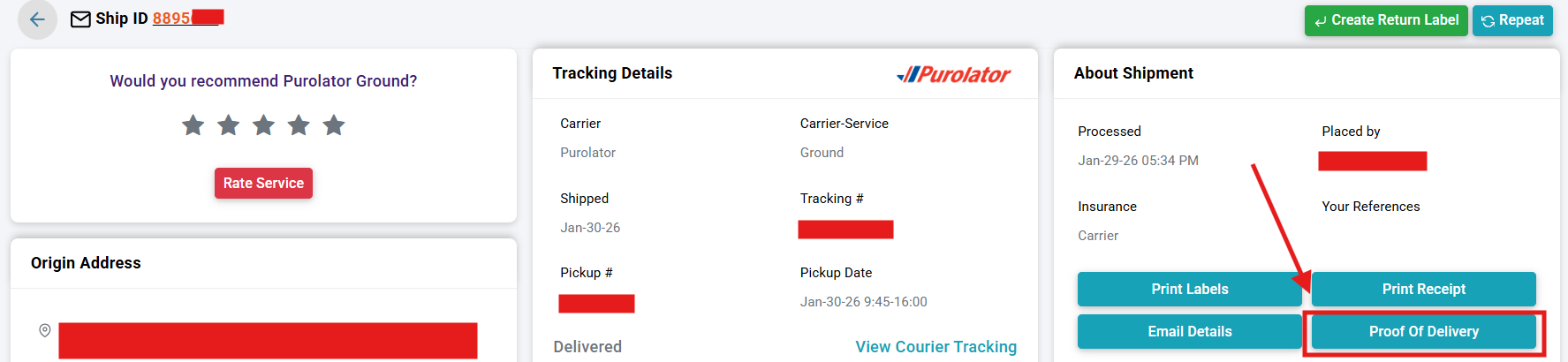
Proof of Delivery is available for most couriers on ShipTime.
POD is not currently available for the following couriers:
For these couriers, PODs may still need to be retrieved directly from the courier’s website, where available.
Having PODs directly in your ShipTime account allows you to:
Quickly confirm successful deliveries
Reduce time spent navigating courier websites
Easily share delivery confirmation with customers or internal teams
Keep all shipment documentation centralized in one place
If you do not see a Proof of Delivery for an eligible shipment, or if you have questions about this feature, please contact the Heroic Support™ Team, and we will be happy to assist.