
Starting July 8, 2026, importers of certain regulated consumer products entering the United States must electronically submit certificate information to the U.S. Consumer Product Safety Commission (CPSC) as part of the customs entry process.
If your business ships regulated consumer products to the U.S., understanding these new requirements can help you avoid customs delays, additional documentation requests, or refused shipments.
ShipTime makes it easy to attach supporting customs and compliance documents to eligible international shipments before they're handed to the courier.
Important: ShipTime cannot determine whether your products are regulated, identify which certifications are required, issue compliance certificates, or provide regulatory advice. The shipper and U.S. importer remain responsible for ensuring products meet all applicable CPSC requirements and that any required electronic filing is completed.
Before You Ship
Not every product entering the United States requires CPSC certification. Requirements vary depending on the product, and some may be subject to multiple regulations.
Before creating your shipment, determine whether your products are subject to CPSC regulations.
1. Review the CPSC Regulated Products List
The CPSC provides a searchable database of regulated products, mandatory safety standards, banned products, and regulated substances.
Keep in mind:
- Products may fall under multiple regulations.
- Not every regulated product is listed individually.
- Similar products can have different compliance requirements.
2. Use the CPSC Regulatory Robot
The CPSC Regulatory Robot is an interactive tool that asks questions about your product and provides general guidance on which safety requirements may apply.
If you manufacture or import multiple product types, complete the assessment for each product separately.
Note: The Regulatory Robot is intended as general guidance only. Importers remain responsible for reviewing applicable regulations and ensuring compliance.
What Documentation May Be Required?
Depending on the product, you may need to provide documentation such as:
- Children's Product Certificate (CPC)
- General Certificate of Conformity (GCC)
- Product testing or laboratory information
- Applicable CPSC regulations or rule citations
- Manufacturing and testing dates
- Manufacturing location information
- Product identifiers (SKU, UPC, model number, etc.)
- CPSC Product Registry certificate identifiers
- Additional documentation requested by the courier brokerage team, customs broker, or CPSC
Your commercial invoice should clearly describe the products being shipped and use identifiers that match your certificate information.
Two Ways to Provide Certificate Information
Businesses can provide CPSC certificate information using one of two approaches
Option 1: Upload a Certificate for Each Shipment
This option works well for:
- Occasional importers
- One-time shipments
- Businesses that do not use the CPSC Product Registry
The process is simple:
- Prepare your required CPC, GCC, or other applicable certificate.
- Create your shipment in ShipTime to generate the courier tracking number.
- Upload the certificate before the shipment is picked up or dropped off.
- Verify that all product descriptions and identifiers match your commercial invoice.
Option 2: Use the CPSC Product Registry
The CPSC Product Registry allows importers to centrally store and manage reusable certificate information.
This option is particularly useful for businesses that:
- Ship the same regulated products regularly
- Use multiple couriers
- Work with different customs brokers
Even when using the Product Registry, supporting documentation should still be attached within ShipTime.
This may include:
- The applicable CPC or GCC
- Product Registry certificate identifiers
- Matching SKUs or model numbers
- Additional supporting documentation
The Product Registry stores reusable compliance information, while ShipTime helps connect that information to the individual shipment.
How to Upload Compliance Documents in ShipTime
When a compliance document must be associated with a courier tracking number, simply create the shipment first, then upload the document before the shipment is handed to the courier.
Available for eligible international DHL, FedEx, and UPS shipments.
Step 1: Create Your Shipment
Complete your shipment in ShipTime and generate your shipping label.
Be sure to note the courier tracking number.

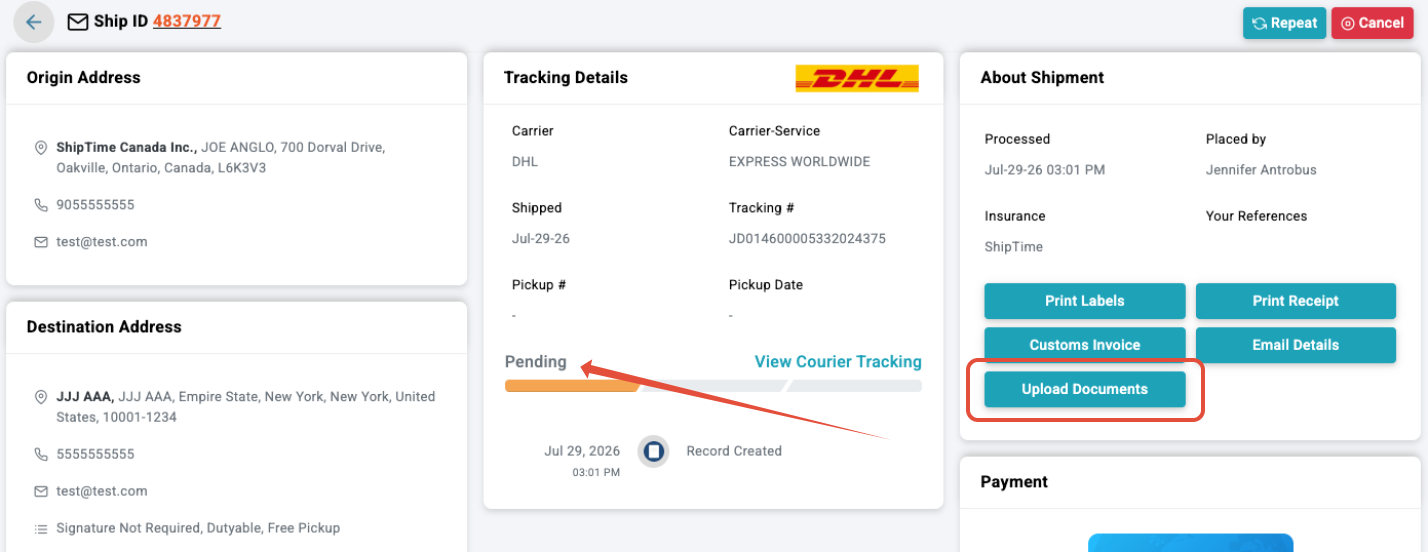
Step 2: Open History & Tracking
Navigate to History & Tracking and open the appropriate Ship ID.
If the shipment is still in Pending status and the selected courier supports document uploads, you'll see the Upload Documents option.
Step 3: Upload Your Document
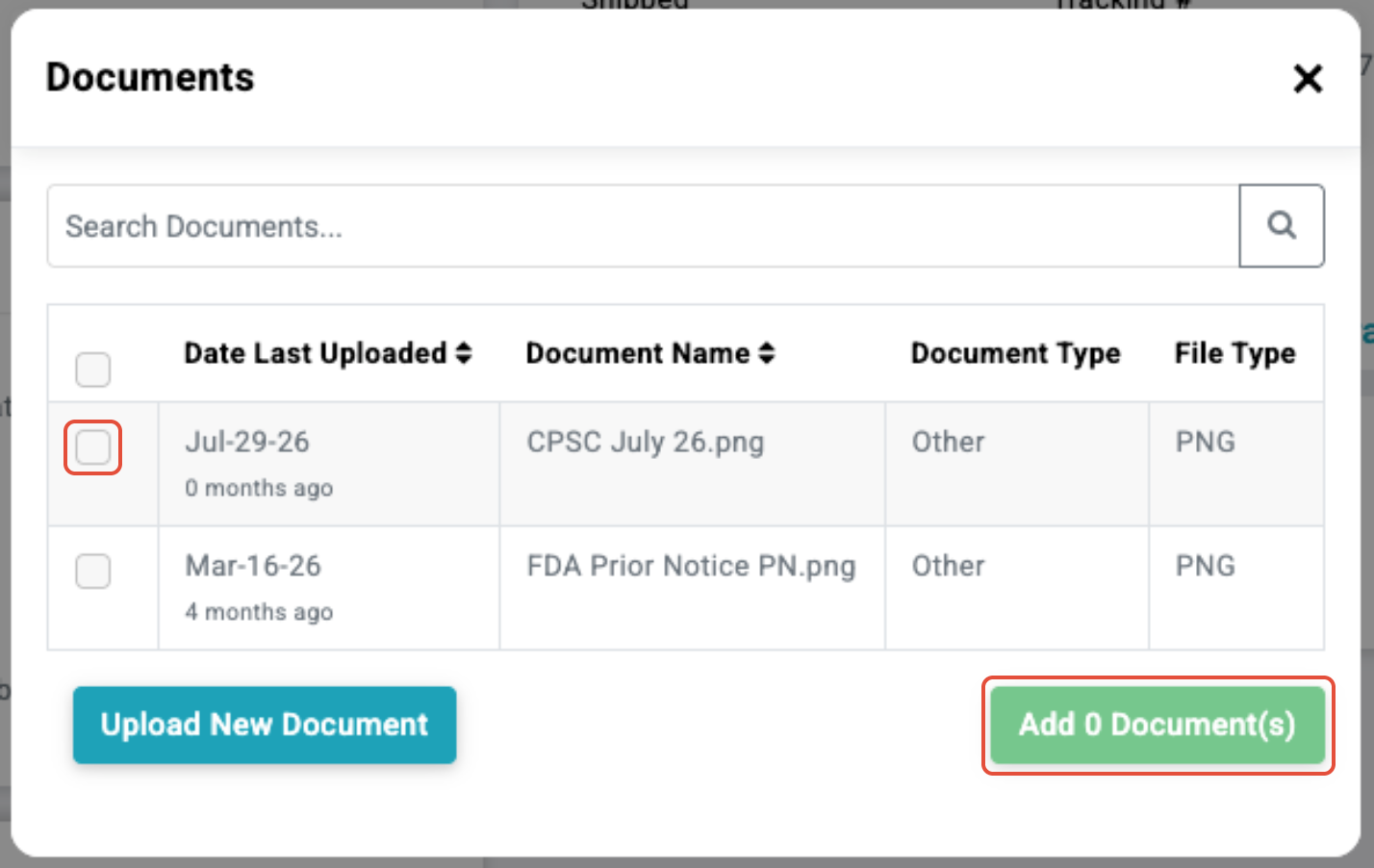
You can:
- Select a document already stored in your ShipTime document library, or
- Upload a new document.
Choose the appropriate document and select Add Document.
Step 4: Confirm the Upload
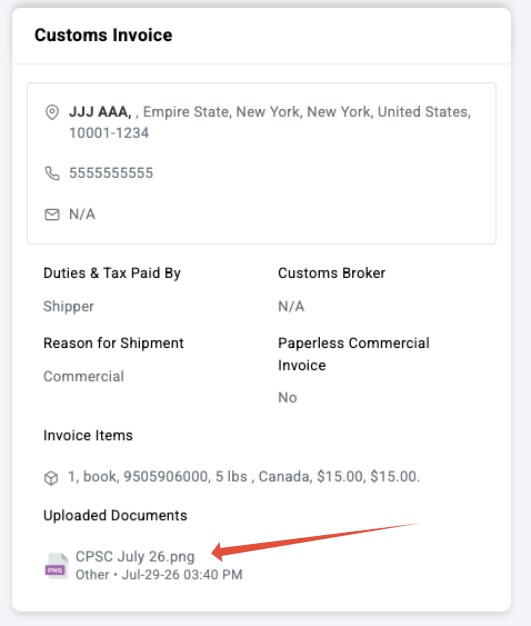
Once the upload is complete, you'll receive a confirmation message.
Your attached document will also appear in the Customs Invoice section of the shipment.
Frequently Asked Questions
Can I upload the document after the courier picks up my shipment?
No.
Documents must be uploaded before pickup or drop-off. Once the shipment begins tracking, the upload option is no longer available.
Do all products entering the U.S. require CPSC documentation?
No.
Only products subject to CPSC certification requirements require this documentation.
Consult the CPSC Regulated Products List and Regulatory Robot to determine whether your products are affected.
Is the CPSC Product Registry required?
No.
The Product Registry is optional and is primarily intended for businesses that regularly import the same regulated products.
Can ShipTime tell me which certificate I need?
No.
ShipTime provides the ability to attach shipment documents but cannot classify products, determine certification requirements, or provide regulatory advice.
Should I still upload documents if I use the Product Registry?
Yes.
Supporting documentation or Product Registry identifiers should still be attached to your ShipTime shipment so the shipment can be linked to the correct certificate information.
Should my tracking number appear on the certificate?
The tracking number is not a required certificate element.
However, including it in the filename or on a cover page can help identify the correct shipment.
Example:
CPSC-Certificate-Tracking-123456789012.pdf
Does uploading a certificate complete the required CPSC electronic filing?
No.
Uploading documents to ShipTime makes them available within the courier shipment workflow.
The required CPSC information must still be properly included as part of the U.S. customs entry process. The importer remains responsible for ensuring all filing requirements are met.
Why This Matters
If required CPSC information is missing, incomplete, or not properly filed, shipments may be:
- Delayed
- Held for additional information
- Selected for examination
- Refused entry
- Returned to the sender
Uploading your compliance documents to ShipTime before pickup helps make the information available to the courier's brokerage team and/or your customs broker, reducing the risk of avoidable delays.
While ShipTime helps streamline document management, the shipper and importer remain responsible for ensuring all applicable CPSC certification and electronic filing requirements have been satisfied.
Need More Information?
For official guidance regarding CPSC eFiling requirements, visit the U.S. Consumer Product Safety Commission or contact the CPSC eFiling Support team: